Skills over MCP in reShapr 1.2: Teach Agents How to Use Your APIs

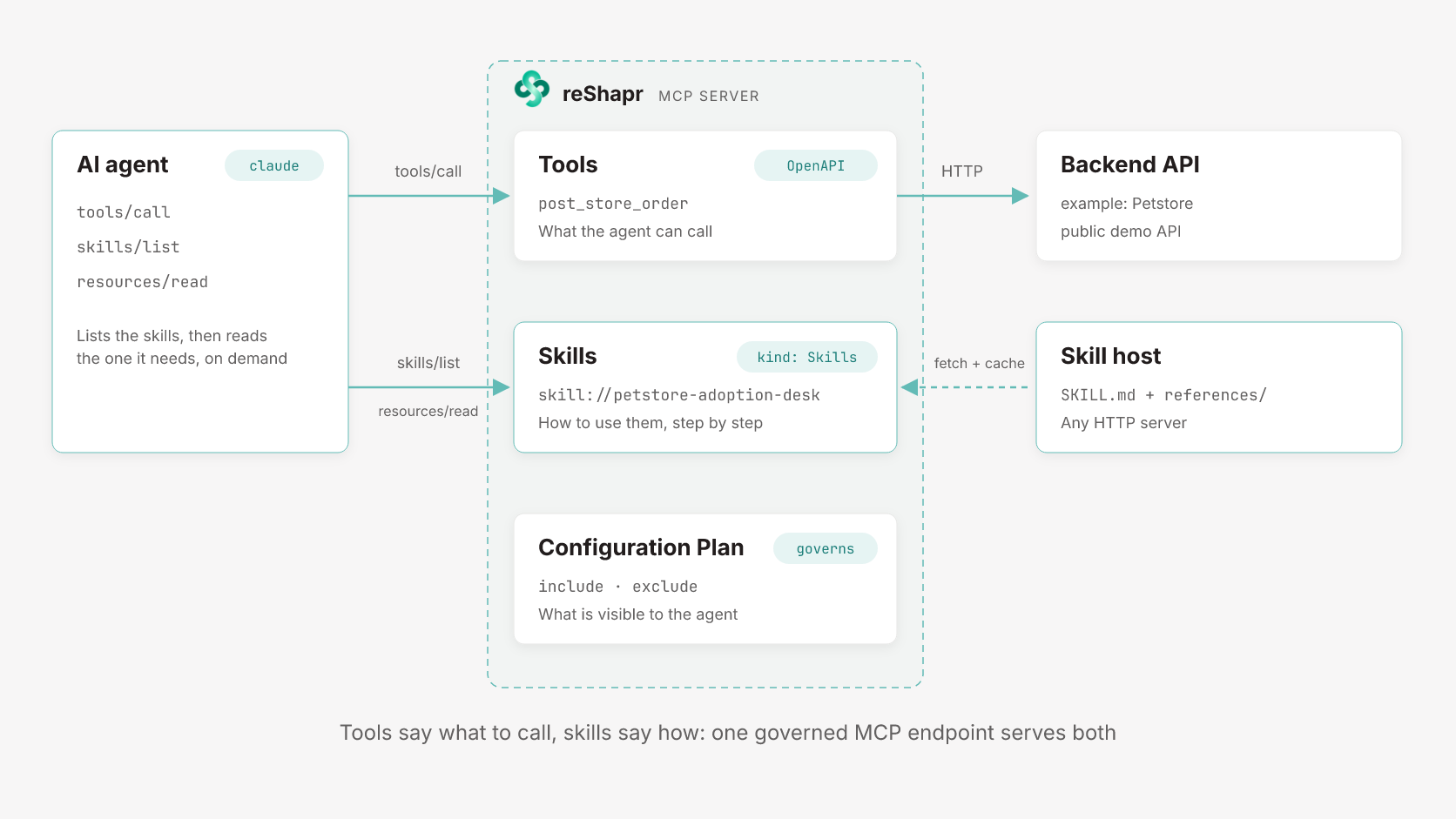
An agent with the right tools can still do the wrong thing. It knows what it can call, but not how your team wants the calls used: which operations first, which rules to apply, when to stop and ask. That knowledge usually lives in a wiki, or in a prompt copied from agent to agent.
reShapr 1.2 serves it from the same place as the tools. Skills over MCP lets you attach an Agent Skill to a Service, and the reShapr runtime exposes it through the official io.modelcontextprotocol/skills extension (SEP-2640). The feature was tracked in reshaprio/reshapr#121.
TL;DR A new Skills artifact points to a skill directory (
SKILL.mdand its reference files) hosted on any HTTP server. reShapr fetches and caches it, then serves it asskill://resources next to your tools. Agents list skills cheaply and read the full instructions only when they need them. We tried it with Claude Code on the Petstore API: without the skill it listed every dog it found (12 in our run), with the skill it offered 3 and waited for a confirmation. Update, 25 Nov 2026: Claude Code 2.1.332 now discovers the skill by itself, with no hint in the prompt. See Run 3 in See it with Claude.
Tools say what, skills say how
| Tools | Skills | |
|---|---|---|
| Answer | What can I call? | How should I use these calls to get the job done? |
| Content | Operations and their schemas | A SKILL.md procedure and reference files |
| Cost for the agent | Listed at connection time | Only the name and description until the skill is read |
| In reShapr | Generated from your API | Attached to the same Service |
Keeping the procedure next to the API has a practical effect: it is versioned with the Service in the control plane, and every agent connected to the endpoint gets the same instructions.
How it works
You write a Skills manifest and attach it to a Service. Each skill points to a directory on an HTTP server and lists its supporting files:
apiVersion: reshapr.io/v1alpha1
kind: Skills
service:
  name: Swagger Petstore - OpenAPI 3.0
  version: 1.0.27
skills:
  petstore-adoption-desk:
    remoteContent: https://raw.githubusercontent.com/reshaprio/reshapr-demos/skills-demo-1.2.0/demos/10-petstore-skills/skills/petstore-adoption-desk
    files:
      - references/ADOPTION-RULES.md
      - references/ORDER-TEMPLATE.md
Example, simplified. The skill name must match the name in the SKILL.md frontmatter. The URL points to the Git tag skills-demo-1.2.0 of the reshapr-demos repository, so no file server is needed.
Then:
- the runtime fetches the files and caches them, with a SHA-256 digest and size for each;
skills/listreturns only the name and short description of each skill, so listing stays light;- the agent calls
resources/readonskill://<name>/SKILL.mdwhen the task matches, then on the reference files it needs.
The skill is text. reShapr serves it and does not interpret it: the agent reads it and follows it with the tools you already expose.
A use case: an adoption desk on the Petstore API
The Petstore API exposes 19 operations as MCP tools, among them delete_pet_petid and put_pet. A model that sees them all will make its own choices. A real team has a procedure.
We wrote the procedure as a skill, petstore-adoption-desk: one SKILL.md and two reference files. This is the main file (shortened):
---
name: petstore-adoption-desk
description: Handle a pet adoption request on the Petstore API. Find available
  pets, apply the desk rules, ask the customer to confirm, then place exactly
  one order. Use when someone wants to adopt, reserve or order a pet.
---

1. Read references/ADOPTION-RULES.md.
2. Call `get_pet_findbystatus` with `status=available`.
3. Keep at most 3 pets that match the request and show them with their `id`.
4. Ask the customer to confirm one pet by `id`. Stop here until they answer.
5. Place the order with `post_store_order`, using references/ORDER-TEMPLATE.md.
6. Reply with the order `id`, the pet and the order `status`.
ADOPTION-RULES.md holds the rules (one pet per order, quantity always 1, never delete or update a pet from this desk), and ORDER-TEMPLATE.md holds the order body.
Two things make this more than a long prompt. The agent loads the reference files only when a step points to them, so the context stays small. And the same endpoint gives every agent the same desk rules.
A skill guides the agent, it does not enforce anything. To make an operation unavailable, exclude it in the Configuration Plan, for example with --excludedOperations when you import the API. Use both: the plan for what is possible, the skill for what is right.
Try it yourself
You need reShapr 1.2.0 or later and its CLI (we tested with 1.2.1), and a container engine: Docker, Podman or apple/container. reshapr run uses the first one it finds, or pick one with --engine docker|podman|apple. The commands use the default local credentials, which you should never reuse outside a demo.
The quickest way is Demo 10 in reshapr-demos. It runs the login, import, attach and Inspector steps below with the manifest shown above, and pauses between steps (press Enter):
git clone https://github.com/reshaprio/reshapr-demos.git && cd reshapr-demos
reshapr run --release 1.2.1
npm run demo:10
Or run the steps yourself (example, simplified):
reshapr run --release 1.2.1
reshapr login -u admin -p password -s http://localhost:5555

reshapr import -u https://petstore3.swagger.io/api/v3/openapi.json \
  --backendEndpoint https://petstore3.swagger.io/api/v3

# attach the manifest shown above, straight from reshapr-demos
reshapr attach -u https://raw.githubusercontent.com/reshaprio/reshapr-demos/main/demos/10-petstore-skills/resources/skills.remote.yaml
Wait a few seconds after reshapr attach, then check that the endpoint serves the skill correctly with the MCP Inspector:
npx -y @modelcontextprotocol/inspector@latest --cli \
  http://localhost:7777/mcp/reshapr/swagger-petstore-openapi-3-0-1-0-27-default \
  --transport http --method skills/list --verify
We got Verified 1 skill and 3 files: no conformance errors. The check ran from the tag URL, with no local file server running and the runtime restarted. It covers the extension conformance, the SHA-256 digest of every file and the match between the SKILL.md frontmatter and the listing.
What we verified
- Discovery.
skills/listreturns the skill name, its description, and the URI, digest and size of its three files.resources/liststays empty: skills are discovered throughskills/list. - Retrieval.
resources/readonskill://petstore-adoption-desk/SKILL.mdreturns the file astext/markdown. - Integrity. When we edited
ADOPTION-RULES.mdon a local file server, the Inspector reported a mismatch: the manifest declared 356 bytes and the fetched file had 401. About 30 seconds later the check passed again, with no action on our side: the runtime caches skill files for 30 seconds and fetches them again when the cache expires. With a tag URL the content does not change under the runtime. - Tools unchanged. The same endpoint still serves the 19 Petstore tools.
To edit the Skill and test your changes without a commit or a tag, see Edit and iterate on the Skill in the demo.
See it with Claude
Step 0: connect Claude Code. First complete Try it yourself: reShapr runs and the skill is attached. Skills from MCP servers need Claude Code 2.1.331 or later in an interactive session, signed in with /login on a Pro, Max or Ultra plan (Team and Enterprise need an admin to turn them on; see Use skills from MCP servers). We used 2.1.332. In an empty folder, add the endpoint as a server named petstore, then start Claude Code:
claude mcp add --transport http petstore http://localhost:7777/mcp/reshapr/swagger-petstore-openapi-3-0-1-0-27-default
claude
Add the server before you start Claude Code: in our test, a session that was already running did not load it (restart Claude Code if you add the server from the prompt). Then check it:
/mcp
/skills
petstore should show as connected with its 19 tools, and /skills should list petstore:petstore-adoption-desk as an MCP skill. Use the server name petstore: the Run 2 prompt refers to it. Depending on your permission mode, Claude asks before tool calls; decline post_store_order if you do not want to place a test order on the public Petstore.
For Runs 1 and 2, on 21 November, we ran Claude Code 2.1.323 headless against the endpoint, with the same MCP configuration both times (the Petstore server over HTTP). Both runs are real, and the data comes from the public Petstore, so names and IDs are examples. We allowed only the read tools, so no order could be placed.
Run 1: the prompt does not mention the skill.
I'd like to adopt a dog. Please handle my request.
Claude connected, found the Petstore tools and called get_pet_findbystatus. It never fetched the skill. It answered with a table of 12 dogs and asked which one to order, suggesting a favourite. The exact pets differ from run to run because the public Petstore data changes.
Run 2: the prompt gives the skill URI.
On the MCP server petstore, read the resource skill://petstore-adoption-desk/SKILL.md,
follow its instructions (including the files it links), and handle this request:
I'd like to adopt a dog.
The sequence, from the tool calls in the run:
ReadMcpResourceToolonskill://petstore-adoption-desk/SKILL.mdReadMcpResourceToolonreferences/ADOPTION-RULES.md, then onreferences/ORDER-TEMPLATE.mdget_pet_findbystatuswithstatus=available- A reply with 3 dogs (Buddy, Max and Charlie in our run, with their
id), a request to confirm byid, and no order yet
That is the procedure: the desk rules cap the offer at 3 pets and stop before the order. Claude Code read the skill and its two reference files through resources/read, and followed them.
What this told us on 21 November. The endpoint served the skill correctly and Claude could use it, but Claude Code 2.1.323 did not discover it on its own from skills/list.
Run 3: Claude Code 2.1.332 finds the skill by itself.
On 24 November, Anthropic put Skills over MCP in public beta in Claude and Claude Code. On 25 November we ran the Run 1 prompt again, unchanged, in an interactive Claude Code 2.1.332 session (auto mode), against the same reShapr 1.2.1 endpoint:
I'd like to adopt a dog. Please handle my request.
/skills listed petstore:petstore-adoption-desk as an MCP skill of about 80 tokens. The sequence:
Skill(petstore:petstore-adoption-desk): the skill loaded first, with no hint in the promptreadMcpResourceonreferences/ADOPTION-RULES.md, then onreferences/ORDER-TEMPLATE.md- A Petstore call for the available pets (35 dogs in our run), then a shell command to filter them
- A reply with 3 dogs and their
id, a request to confirm byid, no order yet, and a reminder of the one-pet-per-order rule
Same prompt, same endpoint, newer Claude Code in an interactive session: the agent now finds the procedure by itself and follows it. Other clients may behave differently: check yours.
Limits to know before you start
- Alpha API. The kind is
SkillswithapiVersion: reshapr.io/v1alpha1. It can change. - Remote content only. Each skill is a directory hosted on an HTTP server. reShapr fetches and caches it, and does not manage its storage. This is convenient with a versioned URL, such as a Git tag: the content is pinned and needs no server of your own. For a private repository, use the
remoteSecretoption. - List the files.
SKILL.mdis implicit, but supporting files must be declared infiles. - Edits show up after the cache expires. The runtime caches the files and their digests for 30 seconds by default (the cache policy of the Configuration Plan can change it). A file you edit appears after that delay, with no action. If you change the manifest, for example to add a file, attach it again: it shows after the same delay.
- Client support varies. Whether an agent uses
skills/listdepends on the client and its version. Claude Code 2.1.323 read the skill only when given its URI; Claude Code 2.1.332 found it by itself (Skills over MCP is in beta there, interactive sessions only). Check the MCP extension support matrix for your client. - Guidance, not enforcement. Keep the Configuration Plan as the control on what an agent can do.
What changed
- One endpoint serves the tools and the procedure. Before, the procedure lived in prompts and wikis.
- The procedure is versioned with the Service. One attached manifest, the same text for every agent.
- The context stays small. Agents see a name and a description until they read the skill.
What is next
reShapr also has skills of its own. The reshapr-builder skill helps a coding agent such as Claude Code or GitHub Copilot create and check reShapr MCP servers.
We are thinking about the next use case: an agent that writes the Skills manifest and checks that the skill is conformant, with the same skills/list --verify check you saw above. It is an idea, not a commitment. If you author skills for your APIs, tell us what you would want from it, on Discord or in reshaprio/reshapr#121.
If you are about to build the same
- Start from a procedure your team already follows, and write it as numbered steps that name the tools.
- Keep
SKILL.mdshort and move the rules and templates to reference files. - Name tools exactly as reShapr exposes them, for example
get_pet_findbystatus, not the OpenAPI operation id. - Exclude the operations the procedure must never call, in the Configuration Plan.
To explore the pieces, see the Skills over MCP overview, the Agent Skills specification, and the reShapr import guide. For the context side, read From Context Overload to Context Control.