From API Sprawl to Agent Actions

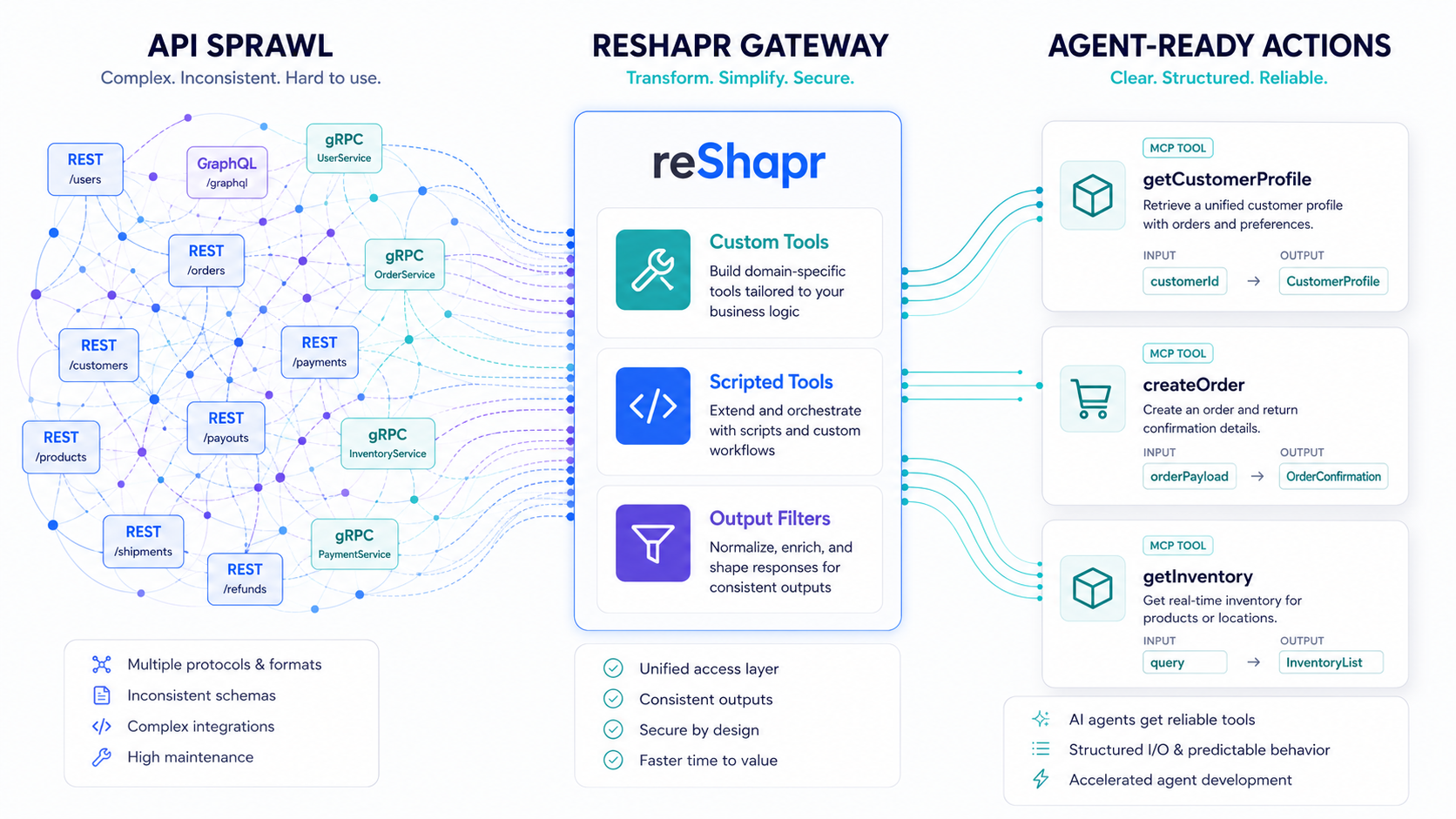
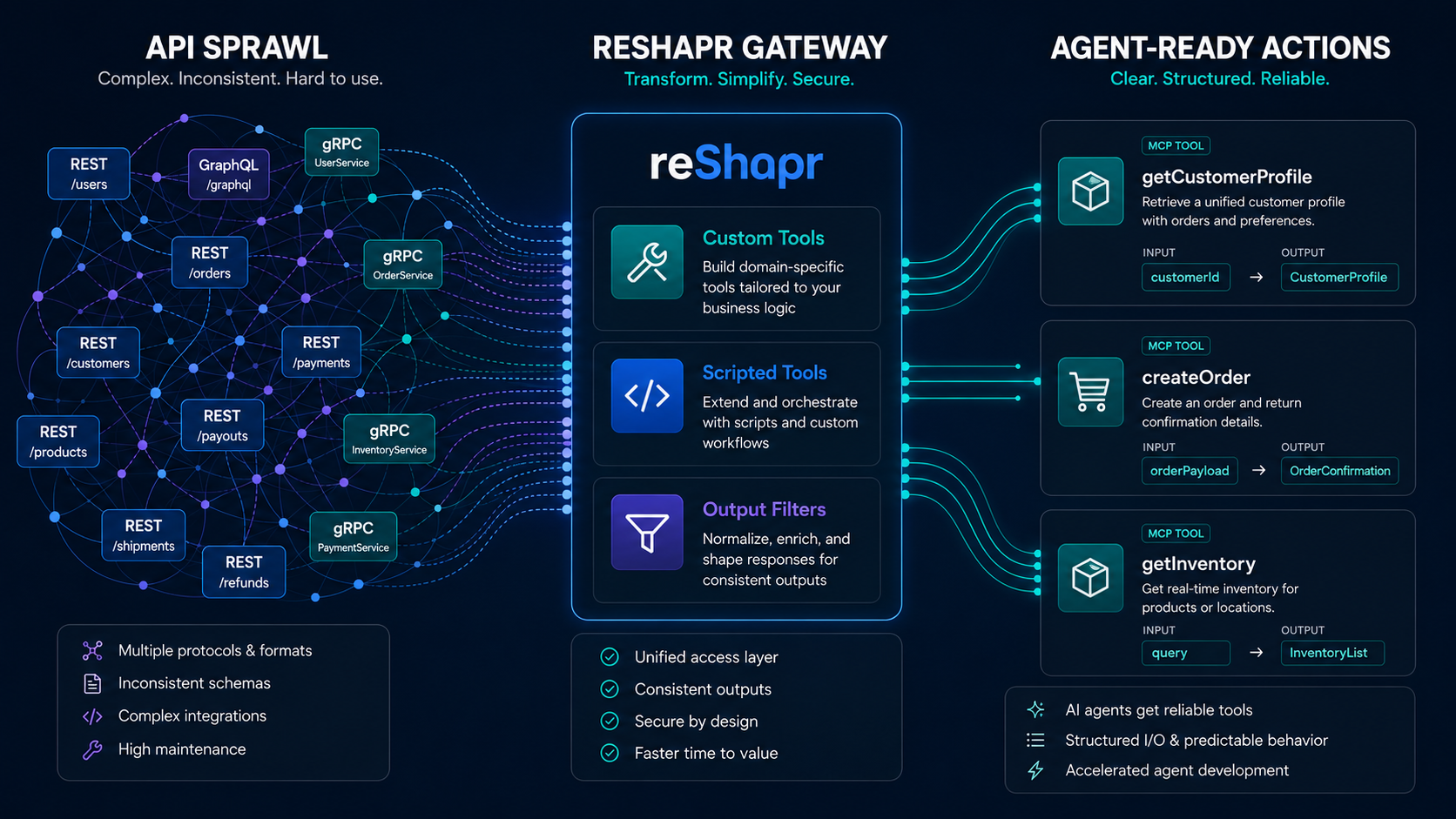
How reShapr Turns Existing APIs Into Agent-Ready Actions
Most organizations already have the APIs they need.
They have REST endpoints, GraphQL schemas, gRPC services, OpenAPI definitions, internal authentication flows, audit trails, rate limits, and operational habits that took years to mature.
The problem is not that these APIs are missing.
The problem is that most APIs were not shaped for agents.
They were designed for developers who understand product boundaries, endpoint naming, error semantics, authentication details, pagination, identifiers, and the right order of calls. An AI agent does not enter the system with that same background. It receives a list of tools, reads their descriptions, chooses one, sends arguments, observes a result, and tries to continue.
If we expose every operation from a large API directly as MCP tools, we push too much responsibility into the model:
- Too many tools to choose from.
- Too many parameters to interpret.
- Too many raw fields returned to the context window.
- Too many multi-step workflows left to probabilistic planning.
- Too much sensitive or irrelevant data crossing the model boundary.
At reShapr, our position is simple:
The future of API-to-MCP is not bigger tool catalogs. It is smaller, clearer, governed agent actions.
Custom exposure beats raw exposure
MCP gives AI clients a common way to call tools, but it does not decide which tools should exist. That design decision matters.
A backend API operation is often too low-level for an agent. It may expose transport-oriented names, nested request structures, broad schemas, optional relation navigation, or fields that are useful to developers but distracting to a model.
reShapr lets you start from existing API artifacts, including OpenAPI, GraphQL, and gRPC/Protobuf, then reshape the exposed MCP surface without rewriting the backend service.
That is the role of Custom Tools.
With a CustomTools artifact, you can define a tool that is smaller, more intentional, and closer to the task the agent must perform:
- Rename a backend operation into a business-friendly tool.
- Replace a complex input schema with a focused one.
- Fix arguments that should not be chosen by the model.
- Bind agent input values into backend arguments.
- Expose only the actions that make sense for a given audience or workflow.
Instead of asking the agent to understand an entire service, reShapr lets you publish a curated interface.
The model should not need to reverse-engineer your API architecture to complete a business task.
From endpoints to business verbs
Consider a commerce platform with separate APIs for orders, customers, inventory, shipping, and refunds.
A raw exposure might give the agent dozens or hundreds of operations:
GET /orders/{id}GET /customers/{id}GET /inventory/{sku}POST /refundsGET /shipments/{id}PATCH /orders/{id}/status
Each endpoint may be valid. Each may be well documented. Each may be useful to an application developer.
But an agent trying to answer "Can we safely refund this delayed order?" should not have to assemble that workflow from scratch every time.
With reShapr, the MCP surface can become:
get_order_summary(orderId)check_refund_eligibility(orderId)prepare_customer_response(orderId)create_approved_refund(orderId, reason)
Those tools express intent. They narrow the parameter space. They reduce ambiguity. They also give platform teams a stable place to enforce policy.
A declarative Custom Tool can map a simple input to a more complex backend request:
apiVersion: reshapr.io/v1alpha1
kind: CustomTools
service:
  name: Orders API
  version: '20260707'
customTools:
  get_order_summary:
    tool: getOrder
    description: Fetch the fields needed to summarize an order for a support agent.
    input:
      type: object
      properties:
        orderId:
          type: string
          description: The public order identifier.
      required:
        - orderId
    arguments:
      id: ${orderId}
      includeCustomer: true
      includeShipment: true
      includeLineItems: true
The MCP client sees one focused tool. The backend still receives the request shape it expects.
That is the important distinction: reShapr adapts the exposure, not the system of record.
When one action needs several API calls
Some agent tasks are not a single backend operation. They require a sequence:
- Fetch the order.
- Check shipment status.
- Verify refund policy.
- Inspect item inventory or replacement availability.
- Return a compact decision.
Leaving that chain entirely to the model has practical costs. Intermediate payloads enter the context window. The model must decide call order. It may retry inconsistently. It may miss a required policy check. It may pass the wrong identifier from one system into another.
This is where Scripted Custom Tools become especially useful.
A scripted Custom Tool lets reShapr expose one MCP tool while running a small JavaScript orchestration behind it. The script does not call arbitrary network endpoints. It calls other reShapr tools through the rs host API, using an explicit allow-list.
That matters because the usual reShapr controls still apply to every underlying call:
- The script-declared Tool allow-list. This restricts script calls; it is not per-Tool OAuth authorization.
- Backend secrets and elicitation.
- Output filtering.
- Audit and distributed tracing when configured.
- Gateway execution limits.
- Cross-service boundaries inside the same organization.
The agent gets one task-specific tool. reShapr handles the controlled API chaining.
apiVersion: reshapr.io/v1alpha1
kind: CustomTools
service:
  name: Orders API
  version: '20260707'
customTools:
  check_refund_eligibility:
    description: Check whether an order can be refunded and return the reason.
    input:
      type: object
      properties:
        orderId:
          type: string
      required:
        - orderId
    tools:
      - tool: getOrder
      - service: "Shipping API:20260707"
        tool: getShipment
      - service: "Policy API:20260707"
        tool: evaluateRefundPolicy
    script: |
      const order = rs.callTool('getOrder', { id: input.orderId });
      if (!order.ok) {
        rs.fail('Unable to fetch order', { orderId: input.orderId, cause: order.error });
      }

      const shipmentId = order.content.shipmentId;
      const shipment = rs.callTool('Shipping API:20260707', 'getShipment', { id: shipmentId });
      if (!shipment.ok) {
        rs.fail('Unable to fetch shipment', { shipmentId: shipmentId, cause: shipment.error });
      }

      const policy = rs.callTool('Policy API:20260707', 'evaluateRefundPolicy', {
        orderStatus: order.content.status,
        shipmentStatus: shipment.content.status,
        totalAmount: order.content.totalAmount
      });
      if (!policy.ok) {
        rs.fail('Unable to evaluate refund policy', { orderId: input.orderId, cause: policy.error });
      }

      return {
        orderId: input.orderId,
        eligible: policy.content.eligible,
        reason: policy.content.reason,
        nextAction: policy.content.eligible ? 'create_refund' : 'escalate'
      };
This is not an agent improvising a workflow in the context window. It is an operator-approved tool with a predictable contract.
Scripted Custom Tools let agents ask for outcomes, while reShapr keeps the workflow inside governed infrastructure.
Optional chaining without losing control
API chaining is powerful, but it should be optional and explicit.
Some tools should stay declarative. A focused wrapper around one backend operation is often the cleanest solution. Other tools need orchestration, parallel calls, conditional checks, or cross-service lookups. reShapr supports both forms in the same CustomTools specification:
- Use
toolandargumentswhen one backend operation is enough. - Use
scriptandtoolswhen the business action needs controlled composition.
That gives teams a practical migration path.
You can begin with selective exposure, then introduce scripted tools only where the workflow deserves it. You do not have to choose between raw endpoint exposure and a fully custom MCP server project. reShapr gives you a middle path: configuration first, scripting where it pays off.
Scripted tools also support asynchronous calls when independent backend calls can run in parallel:
const order = rs.callToolAsync('getOrder', { id: input.orderId });
const risk = rs.callToolAsync('Risk API:20260707', 'scoreOrder', { orderId: input.orderId });
const results = rs.awaitPromises([order, risk]);

return {
  order: results[0].ok ? results[0].content : { error: results[0].error },
  risk: results[1].ok ? results[1].content : { error: results[1].error }
};
The model does not need to juggle those intermediate calls. It receives the final result the tool was designed to return.
Output control is as important as input control
Custom Tools shape what the model can ask for. Tools Output Filtering shapes what the model receives back.
That second half is critical.
Even a well-designed tool can return a backend payload with too many fields. A customer object may include internal IDs, addresses, risk flags, metadata, nested arrays, pagination cursors, or fields that have no value for the current agent. A GraphQL response can be especially dense. A REST payload can be deeply nested. A gRPC response can still become large once converted to JSON.
reShapr applies ToolsOutputFilters after the backend response has been converted into canonical JSON and before the MCP response is returned to the client.
For example, the earlier get_order_summary tool may receive a rich backend order payload, but the agent only needs the fields required to answer support questions clearly.
apiVersion: reshapr.io/v1alpha1
kind: ToolsOutputFilters
service:
  name: Orders API
  version: '20260707'
filters:
  get_order_summary:
    jsonRetain:
      - /id
      - /status
      - /totalAmount
      - /customer/name
      - /shipment/status
      - /lineItems
    convertToToon: true
This keeps the context window focused on the order summary, not on the backend's full data model.
A governed BFF, or BFA, for agents
Traditional applications often use a Backend for Frontend pattern. The frontend should not be forced to understand every internal service, so teams create an API layer shaped for that user experience.
A similar idea is emerging for agents. In The Back-end for Agents Pattern (BFA), Michael Douglas Barbosa Araujo describes a mediating layer where agents call stable, task-oriented operations instead of coupling directly to domain APIs, internal schemas, and backend workflows.
reShapr makes this pattern concrete for MCP. Custom Tools define the agent-facing contract, Scripted Custom Tools compose approved backend calls, and Tools Output Filtering controls what returns to the model.
Agents need the same separation, optimized for tool choice, token budget, determinism, policy enforcement, traceability, data minimization, and safe cross-service workflows.
reShapr provides that layer for MCP.
It lets platform teams translate existing systems into task-specific tools while preserving the governance already built around those systems. Agents do not receive raw operational sprawl. They receive an approved action surface.
That surface can be different for each use case:
- A support agent can see refund, shipment, and customer-summary tools.
- A finance agent can see reconciliation and invoice tools.
- A developer agent can see build, deploy, rollback, and incident tools.
- A partner-facing agent can see a stricter filtered subset of the same backend capabilities.
Same services. Different exposures. Different contracts. Different output policies.
reShapr does not ask enterprises to replace their APIs. It lets them expose the right version of those APIs to agents.
Why this matters in production
Prototype MCP servers can tolerate rough edges. Production systems cannot.
In production, every exposed tool becomes part of an operational contract covering access, credentials, data boundaries, deterministic behavior, observability, and failure handling.
reShapr's advantage is that these questions are addressed at the integration layer, not left to every agent prompt.
Custom Tools reduce the visible action surface. Scripted Custom Tools make multi-call workflows explicit. Tools Output Filtering keeps responses small and controlled. Gateway guard-rails bound script execution with configurable limits such as timeout, maximum tool calls, and maximum scripted nesting depth.
Together, these capabilities turn MCP exposure from a raw protocol bridge into an agent-ready integration fabric.
In summary: expose actions, not sprawl
The easiest way to connect an API to MCP is to expose everything.
It is also the least disciplined.
The better path is to design the MCP surface with the same care we already apply to public APIs, internal platforms, and production automation.
With reShapr:
- Custom Tools turn backend operations into clear agent actions.
- Scripted Custom Tools compose approved tools into deterministic workflows.
- Tools Output Filtering removes irrelevant or sensitive response data before it reaches the model.
- Protocol conversion lets the same approach work across REST, GraphQL, and gRPC.
- Gateway controls keep security, secrets, elicitation, audit, and tracing in the infrastructure layer.
The result is not just API-to-MCP conversion.
It is API-to-agent design.
Agents work best when they are given fewer, better tools. reShapr is how existing APIs become those tools.